MobileSheets
- 4.7
- Rating
- 100.00K
- Installs
- $15.99
- Price

 Analysis by App-foxy
I first understood the appeal of MobileSheets when I imagined preparing for a rehearsal with a folder full of printed music, loose annotations, and one piece that had been revised at the last minute. This Android app, made by Zubersoft, is designed to turn that scattered material into a more manageable digital sheet-music workflow. After using it as a music reader rather than treating it like a simple document viewer, I found that its real value comes from the way it organizes performance material before you actually play.
It is not aimed at casual music listening, and it is not a general note-taking app with a music-related name. It belongs in the Music & Audio category and focuses on musicians who need their scores available, readable, and arranged for practical use. The current release is version 3.9.43, Build 592, and it runs on Android 7.0 or later. The app costs $15.99, so I would not recommend buying it just to open an occasional PDF. Its strengths become clearer when sheet music is part of your regular routine.
From a messy folder to a usable rehearsal setup
I find that a smooth rehearsal starts before the first note: the scores need to be easy to identify, in the right order, and checked for awkward page breaks. This section looks at how I would turn a scattered collection into a focused set without trying to organize everything at once. From there, the next step is seeing whether that preparation holds up when rehearsal begins.
You May Also Like

 Pandora - Music & Podcasts
Pandora’s Music Is Easy to Start, but Harder to Recover
Pandora’s strength is its low-effort path from a seed to a station. Its weak spot is how much confidence it asks you to place in connection, setup, and quiet recovery.

 AccuWeather: Weather Radar
AccuWeather Review: A Quick, Clear Forecast for Everyday Decisions
For everyday plans, the best forecast is the one you can understand quickly. AccuWeather makes rain timing, radar, and local conditions easy to act on, with a few trade-offs.

 Hill Climb Racing
Why Hill Climb Racing Still Turns Crashes Into One More Run
A tiny car, a bumpy hill and one more upgrade: Hill Climb Racing keeps resurfacing because its simple chaos makes every near-miss feel personal.

 AliExpress - Shopping App
AliExpress Makes Global Shopping Feel Personal, but Shoppers Bear the Risk
AliExpress turns a global marketplace into a pocket-sized discovery engine. Its reach is useful, its shopping loop compelling, and its trade-offs easy to miss.

 Lords Mobile: Kingdom Wars
Lords Mobile Is a Kingdom-Building Routine, Not a Quick Match
A case-by-case verdict on the building, battles, device demands, and social commitments that make Lords Mobile rewarding for some players and exhausting for others.

 PDF Scanner app - TapScanner
TapScanner Makes Paperwork Easier to Capture, Check, and Share
TapScanner makes scanning with a phone feel less like a rescue operation and more like a dependable step in getting work done. Its capture tools are useful, though not flawless.
More From Our News Desk
View All News


Starting with the material you already have
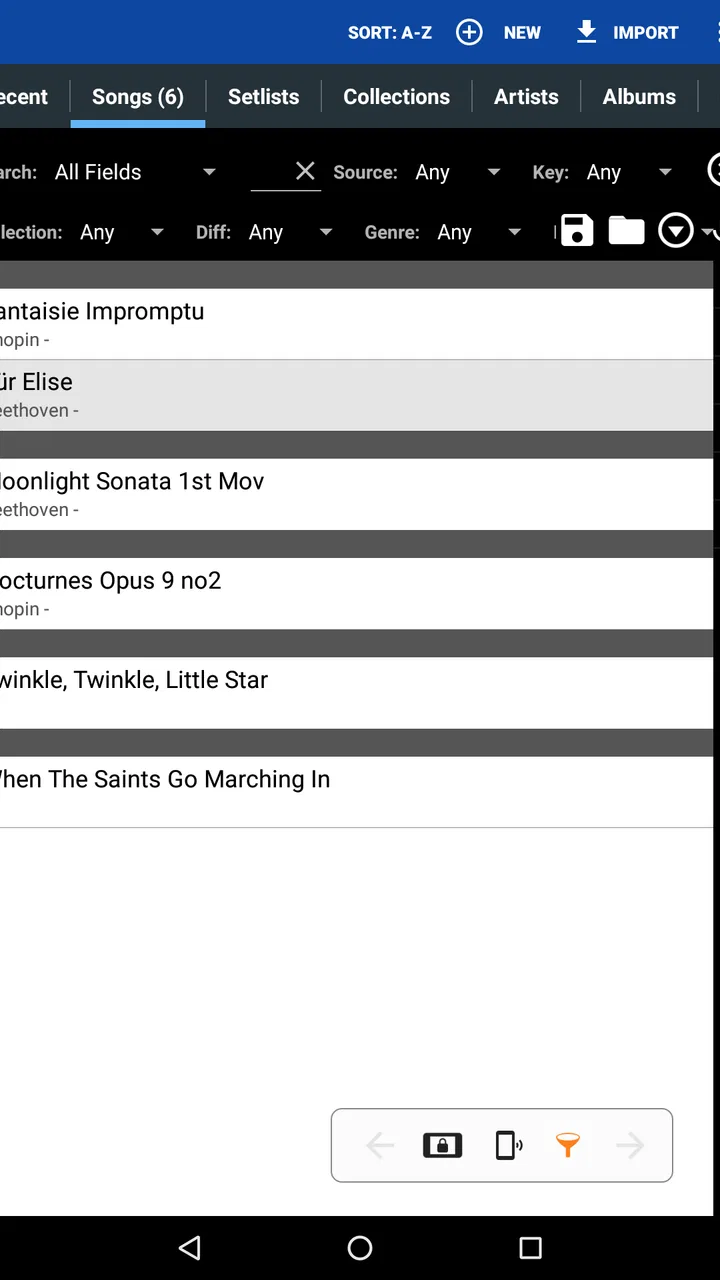
My preferred way to begin with MobileSheets is not by trying to rebuild an entire music library in one sitting. I would start with the pieces needed for the next rehearsal or performance. That keeps the first setup focused: bring in the relevant scores, check how each page looks, and arrange them so the transition from one piece to the next feels natural.
This matters because a digital score is only useful when it is ready at the moment you need it. A file can exist on a phone or tablet and still be difficult to use if the pages are in the wrong order, the title is unclear, or several versions of the same piece are mixed together. MobileSheets is most convincing when treated as a working library rather than a storage box.
I also like the idea of separating preparation from performance. Before rehearsal, I can concentrate on importing and organizing. During rehearsal, I want the screen to behave like a dependable music stand. That change in mindset helps avoid the common mistake of opening files one by one while everyone else is waiting.
Building a library instead of browsing random files
The first useful habit is to give each piece enough identifying information to find later without remembering the exact filename. A library organized around composer, title, instrument, ensemble, or occasion is much more practical than a download folder. I would also avoid keeping multiple nearly identical scans unless there is a clear reason, because digital clutter becomes just as distracting as a pile of paper.
For a pianist preparing several works, the useful unit is not always a single document. A recital program, a lesson plan, or a rehearsal set may require a sequence of pieces. For a band or small ensemble, the important question may be whether all the charts for one engagement can be located together. MobileSheets makes more sense in these situations because the organization is connected to how musicians actually work.
A less obvious benefit is that the library can reduce the mental load before playing. I do not have to remember where a particular scan was saved if I have already made the collection searchable and recognizable. That sounds minor, but it becomes valuable when a conductor changes the order, a teacher asks for an older exercise, or a player needs to move quickly between contrasting pieces.
Checking page quality before the pressure starts
Imported sheet music should be checked before the rehearsal begins. A scan that looks acceptable on a large computer monitor may have cramped margins or faint symbols when viewed on a smaller device. I would inspect the first page, a dense middle page, and any page containing small annotations. This simple check catches problems before they interrupt playing.
Page order deserves the same attention. A score with a missing page or an unexpected blank page can be surprisingly hard to diagnose once the music is underway. I would move through the document at least once, especially when it came from a scan rather than a clean digital source. The app can help present the material, but it cannot make a badly scanned score musically correct.
This is one of the important trade-offs with digital sheet music: preparation takes time up front, but the payoff is a cleaner session later. If you only need to view one short score once, that preparation may feel excessive. If you return to the same repertoire repeatedly, it becomes a sensible investment.
Adding performance information where it helps
Annotations are most useful when they preserve a decision I would otherwise have to remember. A fingering reminder, a breath mark, a cue for a page transition, or a warning about an awkward entrance can be placed directly beside the relevant passage. I prefer short, specific marks over covering the page with comments, because the screen still needs to remain readable while playing.
There is also a practical difference between marking a score during a quiet practice session and marking it in a live rehearsal. In the first situation, I can be precise. In the second, speed matters more. I would use a consistent visual language: one kind of mark for musical interpretation, another for logistics, and another for corrections. That makes old annotations easier to understand weeks later.
One advanced workflow is to prepare a clean master score and keep performance-specific notes in a separate working version. That approach is useful when the same piece serves different groups or teachers. It prevents a temporary rehearsal instruction from becoming permanently embedded in the only copy you have.
Preparing the handoff from preparation to playing
The most important handoff is the moment when the app stops being a library and becomes a performance tool. Before I rely on it, I would open the complete set in the intended order, confirm that every piece is present, and make sure the display is comfortable at the distance from which I will play.
This is also where I would decide whether the device itself is suitable. A large screen is naturally easier for full orchestral pages, while a smaller phone may be convenient for reference but less comfortable for sustained reading. MobileSheets can organize the content, but the physical screen still determines how much music fits comfortably and how often I need to move through pages.
If another musician, teacher, or bandmate needs the same material, I would treat sharing as a separate preparation step rather than assuming that a personal library automatically becomes a group library. Each person may have different page sizes, annotations, and preferred order. The app is strongest when one user takes responsibility for making a reliable personal set, not when a group expects every device to behave identically without checking.
Using the set during rehearsal and performance
Once the set is ready, I pay attention to the small moments that can interrupt playing: finding the next piece, handling a difficult turn, and keeping annotations clear under pressure. I’ll look at how I would use the prepared material in a real session, including where a digital score helps and where paper or a shared workflow may still be the better fit.
Moving through music without losing the thread
Once a piece is open, the goal is simple: keep attention on the notation. I found that the app works best when navigation choices are settled before playing. If I am still deciding how to move between pages while counting rests, the technology has become part of the problem.
For consecutive pieces, an organized set reduces the awkward pause between selections. Instead of closing one file, searching for another, and trying to remember the intended order, I can work through a prepared sequence. That is particularly useful for lessons and rehearsals where the next item is known in advance but the session moves quickly.
A realistic example would be a weekend ensemble rehearsal. On Friday evening, I gather the charts for the session, arrange them by the rehearsal plan, and add a few reminders to difficult entrances. On Saturday, I open that prepared collection rather than searching through general storage. When the leader skips ahead or returns to an earlier number, the value is not visual decoration; it is the ability to recover quickly without spreading papers across a stand.
Making annotations useful rather than distracting
Digital marking is convenient, but it can also tempt me to annotate every thought. I get better results when I mark only information that changes how I will play. A small note about an entrance or a corrected accidental has a clear purpose. A page filled with temporary comments becomes harder to read and may obscure the original notation.
I would also review annotations after rehearsal. Some marks are reminders for one session and should be removed or rewritten afterward. Others represent a lasting interpretation and deserve to stay. This cleanup step is easy to skip, yet it determines whether the library becomes more useful over time or gradually turns into a confusing record of old instructions.
For teaching, the distinction is especially helpful. A teacher may want to demonstrate several possible solutions, while a student needs a clear final instruction for practice. Keeping those two stages mentally separate makes the score easier to follow when practicing alone later.
Handling page turns as a musical decision
Page turns are where a sheet-music reader proves whether it belongs in real performance use. A page turn that happens during a sustained note is manageable; one that lands in a rapid passage or during a long two-handed phrase is not. I would inspect every turn in a demanding piece and plan around the music rather than trusting the default sequence blindly.
Sometimes the best solution is to adjust the viewing arrangement or prepare the piece so that a difficult passage is not split at the worst possible point. This is one of the less obvious reasons to review the score as a performer, not merely as a document. The page layout is part of the workflow, and a technically complete file may still be inconvenient on stage.
Musicians who already use paper may wonder whether the change is worth it. My answer depends on repertoire. For short, stable pieces, paper remains wonderfully immediate. For a large collection with repeated revisions, set lists, and annotations, the digital approach can save time after the initial setup. The benefit is less about replacing paper in every situation and more about choosing a format that matches the job.
What happens when the device is handed to someone else
A handoff can mean passing the device to a page turner, showing a marked passage to a teacher, or giving another player access to the same chart. In each case, readability matters more than organization alone. I would avoid relying on tiny marks or subtle colors that make sense only to me. A note should be understandable when viewed by the person who needs it.
For collaborative work, I would also agree on which copy is authoritative. If one musician corrects a measure while another continues using an older version, the library can create false confidence. MobileSheets helps keep material together, but it does not remove the human need to communicate which revision should be used.
This is a genuine friction point for ensembles. The app can make my own setup tidy, but it cannot automatically solve differences in repertoire versions, annotation habits, or device preferences. A group that wants one synchronized system may prefer a dedicated collaboration platform, while an individual musician who needs a strong personal score library is more likely to appreciate this app.
What the finished workflow feels like
When the workflow succeeds, the result is pleasantly unremarkable. I open the prepared material, find the piece without hesitation, read it at a comfortable size, and keep my attention on playing. The app does not need to call attention to itself. Its job is to remove avoidable searching and make the score available in a form that fits the session.
That quiet reliability explains why the app has attracted a 4.7 average from around 5.2 thousand ratings, with more than 100 thousand installs. Those figures suggest a well-established niche rather than a novelty tool. I would still judge it by my own repertoire and device, but the level of adoption makes it easier to view MobileSheets as a serious working application rather than an experiment.
The current version, 3.9.43 Build 592, is relevant for anyone comparing older discussions with present use. Android compatibility begins at version 7.0, which covers a broad range of devices, although compatibility alone does not guarantee that every screen will be equally comfortable for music reading. For this kind of app, display size and handling often matter as much as the operating system.
Where the flow breaks down
The first weak point is the initial organization. If I import a large, untidy collection and expect the app to understand my musical priorities automatically, I am likely to be disappointed. The library becomes useful because I prepare it thoughtfully. That is a strength for organized users, but a barrier for anyone who wants instant, zero-maintenance access.
The second weak point is the cost. At $15.99, MobileSheets is a paid purchase rather than a casual download. I think that price is easier to justify for students with substantial repertoire, accompanists, teachers, worship musicians, ensemble players, and anyone who repeatedly carries the same scores. A person who reads music only a few times a year may be better served by existing files, printed copies, or a simpler viewer.
The third issue is that digital convenience depends on the entire setup. A device with a cramped display, poor placement, or an uncomfortable viewing angle can make a carefully organized library frustrating. I would not buy the app first and think about the hardware later. I would decide where and how I play, then check whether that device makes the reading experience practical.
There is also a human limitation: no score app replaces musical preparation. It can show the notation and keep material arranged, but it cannot resolve an unclear edition, repair a poor scan, or decide which interpretation belongs in a performance. Users expecting automatic musical intelligence may find the experience more hands-on than anticipated.
Who should choose it, and who should skip it
I would recommend MobileSheets to musicians who regularly manage multiple scores and want one dedicated place for reading, organizing, and marking them. It is especially appealing when the same material moves through practice, rehearsal, teaching, and performance. The more often I repeat that cycle, the more valuable the preparation becomes.
I would be cautious if my main need is casual viewing on a phone. A general document reader may be sufficient for opening a single file, and paying for a specialized music workflow would not necessarily improve that experience. I would also look elsewhere if my priority is real-time collaboration across an entire ensemble rather than personal control of a score library.
Compared with printed folders, the app offers easier rearrangement and less physical bulk, but it demands device preparation and careful file organization. Compared with a basic PDF reader, it is more focused on the way musicians return to scores, annotate them, and use them in sets. Compared with a cloud-centered collaboration service, it feels more like a personal working environment than a shared rehearsal office.
My recommendation after following the complete workflow
For me, the deciding question is not whether MobileSheets can display sheet music. Many tools can do that. The question is whether I will benefit from turning a repeated musical routine into a prepared sequence: gather the material, organize it, inspect the pages, add purposeful marks, rehearse from the set, and refine it afterward.
Zubersoft has made an app that suits musicians willing to take ownership of that process. It is rated Everyone, which fits its straightforward subject matter, but its practical audience is narrower than the age label suggests: people who actively read and manage notation. The app rewards preparation and becomes less compelling when the need is occasional or extremely simple.
My final view is positive, with one condition: use it as a working music library, not merely as an expensive file opener. If I were preparing a serious repertoire list or trying to reduce the friction between practice and performance, I would choose MobileSheets. If I only needed to glance at a score now and then, I would keep my setup simpler and spend the money elsewhere.
FAQs for MobileSheets
01What is MobileSheets, and who is it designed for?
MobileSheets is a digital sheet-music reader designed primarily for musicians, singers, teachers, and performers who want to replace paper music with a tablet or phone. After organizing your scores into a library, you can open them during practice or performances, annotate pages, create setlists, and turn pages manually or with compatible Bluetooth foot pedals. It is especially useful for users managing large collections of PDF or image-based music.
02Can I import my existing sheet music into MobileSheets?
Yes. MobileSheets is built to work with sheet music you already own in supported digital formats, including PDF files and image-based documents. You can transfer files from your device storage or other available sources and then organize them using titles, composers, genres, tags, and collections. The exact import process may vary depending on your device and file location, so keeping a backup of your original scores is recommended before reorganizing your library.
03Does MobileSheets work offline during rehearsals or performances?
MobileSheets can generally be used offline once your music files have been imported and stored on the device. This makes it practical for rehearsals, concerts, churches, classrooms, and other locations where internet access may be unreliable. However, features involving cloud storage, online file transfers, synchronization services, or external integrations may require a connection. It is best to open important scores in advance and confirm that every page is available offline.
04What performance and annotation tools are included in MobileSheets?
MobileSheets includes tools intended to make digital performance more convenient than simply viewing a PDF. You can move through pages, create setlists, add bookmarks, crop or adjust page displays, and write annotations such as markings, reminders, or performance notes. Depending on your setup, you may also use automatic scrolling, half-page turns, or compatible foot pedals. Musicians should test these controls before a live performance to ensure the chosen layout works comfortably.
05Is MobileSheets available for iPhone and iPad, and what should I check before downloading?
Before downloading MobileSheets, check the store listing for the current platform availability, supported operating-system version, device requirements, and pricing, because these details can change between releases. Users should also consider screen size and storage capacity: a larger tablet is usually much more comfortable for reading full pages than a phone. If you plan to synchronize libraries or use a Bluetooth pedal, verify compatibility with your specific device and accessories first.
Pros
- Excellent for organizing large digital sheet music libraries.
- Supports annotations
- bookmarks
- setlists
- and customizable display options.
- Works well with Bluetooth page-turning pedals.
- Offers hands-free performance with auto-scroll features.
- Can import music from multiple file formats and cloud services.
Cons
- The interface may feel complex for beginners.
- Many advanced features require time to configure properly.
- The app is paid
- with some features varying by platform.
- Large libraries can require considerable device storage.
- Editing scanned scores may be limited without external tools.

MobileSheets
Gallery